Best USB-C Hubs for Students in 2026: More Ports Without a Full Dock
Need more ports without building a full desktop dock? These four USB-C hubs cover student setups from basic HDMI and USB expansion to Ethernet, SD cards, 10Gbps data, and laptop charging.
Research checked
Modern student laptops keep getting thinner, but that often means losing useful ports. A USB-C hub can add HDMI, USB-A, Ethernet, card readers, and charging without the footprint of a full docking station.
For many students, a compact hub is easier to carry between a dorm and library and simpler to use on a small desk. The right choice depends on whether you need one monitor, fast storage, wired Internet, removable media, or laptop charging.
We have not personally tested these USB-C hubs. Our recommendations are based on manufacturer specifications, product documentation, available user feedback, and practical student workspace use cases.
Quick Picks
Choose your use case · Jump to the details
Not sure whether your setup needs a hub, a stand, a dock, or something else? Try our Product Finder to narrow down the right direction for your workspace.
Quick Comparison
Swipe across the table to compare all seven columns.
| Product | Best for | HDMI | Fastest USB data | Ethernet | Card reader | Laptop charging |
|---|---|---|---|---|---|---|
| Anker 555 USB-C Hub | Best Overall | Up to 4K60 | 10Gbps | Yes, 1Gbps | SD + microSD | Up to 85W |
| Anker 5-in-1 A8357 | Best Budget | Up to 4K30 | 5Gbps | No | No | Up to 90W |
| Anker 543 USB-C Hub | Wired Internet | Up to 4K30 | 5Gbps | Yes, 1Gbps | No | Up to 53W |
| Anker USB-C Hub 7-in-1 (A83D2) | SD Cards & Portability | Up to 4K60 | 5Gbps | No | SD + TF/microSD | Up to 85W |
Pass-through charging depends on a suitable USB-C charger; chargers are not included where noted in the product details.
Best Overall: Anker 555 USB-C Hub (8-in-1)

Anker
Anker 555 USB-C Hub (8-in-1)
Best OverallThe most complete option here for students who need fast data, 4K60, Ethernet, card readers, and charging.
If you want one USB-C hub that can stay useful as your student setup becomes more demanding, the Anker 555 is the most complete option in this group.
Its two USB-A data ports and downstream USB-C data port can each reach up to 10Gbps, making it a better fit for external SSDs, large media files, research datasets, and backups than hubs limited to 5Gbps or USB 2.0 speeds.
The HDMI output can reach up to 4K at 60Hz on compatible devices. That matters if an external monitor is part of your everyday workspace. The 555 also includes Gigabit Ethernet plus separate SD and microSD card slots.
With a suitable 100W USB-C charger, the hub can provide up to 85W of pass-through charging to the host laptop while remaining functional.
Why it works well for students
The Anker 555 makes sense when your laptop is becoming the center of a real desk setup but you still want something compact enough to put in a bag. It can connect a monitor, Ethernet, storage, memory cards, and common USB peripherals without stepping up to a larger docking station.
What to keep in mind
4K at 60Hz depends on the connected laptop supporting the required display bandwidth. The downstream USB-C data port is for data rather than monitor output. The built-in host cable may also leave the hub hanging if your laptop sits high on a stand.
Best fit
Choose the Anker 555 if you expect to use an external monitor regularly, transfer large files, connect Ethernet, or work with SD cards.
Pros
- 10Gbps USB data
- 4K60 on compatible hosts
- Gigabit Ethernet plus SD and microSD
Cons
- More capability than a basic setup needs
- Charger not included
Key specs from the research
Manufacturer / retailer specifications; not personally tested. Unavailable fields are omitted.
- Compatibility
- 4K at 60Hz depends on the host laptop's display bandwidth; downstream USB-C port is data-only.
- 8 ports
- HDMI up to 4K at 60Hz on compatible hosts
- 2 USB-A and 1 USB-C data ports up to 10Gbps
- Gigabit Ethernet
- SD and microSD readers
- Up to 100W PD input and 85W pass-through charging
- Charger not included
Best fit: Students building a flexible desk setup around one laptop.
Best Budget: Anker USB-C Hub (5-in-1, 4K HDMI)

Anker
Anker USB-C Hub (5-in-1, 4K HDMI)
Best BudgetA focused option for HDMI, everyday USB-A accessories, and pass-through charging.
Not every student needs Ethernet, card readers, or 10Gbps storage. If your real requirement is simply that your laptop does not have enough everyday ports, the Anker 5-in-1 A8357 is a focused solution.
It adds HDMI, three USB-A connections, and USB-C pass-through charging in a compact adapter. HDMI supports up to 4K at 30Hz, while one USB-A port supports up to 5Gbps data. The other two USB-A ports are USB 2.0 connections limited to 480Mbps, which is reasonable for keyboards, mice, receivers, printers, and other low-bandwidth accessories.
With a suitable 100W USB-C charger, it supports up to 90W pass-through charging to the laptop. The charger is not included.
Why it works well for students
A common student setup might include HDMI to a monitor or classroom display, a mouse receiver, a keyboard, a flash drive, and laptop charging. This hub can cover that type of setup without charging for Ethernet or card readers you may never use.
What to keep in mind
The HDMI output tops out at 4K at 30Hz, and two of the three USB-A ports are limited to USB 2.0 speeds. Keep external SSDs and other high-speed storage on the single 5Gbps port. There is no Ethernet port or SD reader.
Best fit
Choose this Anker 5-in-1 if price matters more than maximum performance and your accessories are mainly a monitor, keyboard, mouse, receiver, flash drive, and charger.
Pros
- Affordable feature set
- One 5Gbps USB-A port
- Up to 90W pass-through
Cons
- Two USB-A ports are USB 2.0
- No Ethernet or card readers
Key specs from the research
Manufacturer / retailer specifications; not personally tested. Unavailable fields are omitted.
- Compatibility
- Model A8357; HDMI up to 4K at 30Hz.
- 5 ports
- 1 USB-A 3.0 port up to 5Gbps
- 2 USB-A 2.0 ports up to 480Mbps
- USB-C PD input
- Up to 90W pass-through charging with a suitable charger
- No Ethernet or card readers
- Charger not included
Best fit: Students who mainly need a monitor, keyboard, mouse, and charger.
Best for Wired Internet: Anker 543 USB-C Hub (6-in-1, Slim)
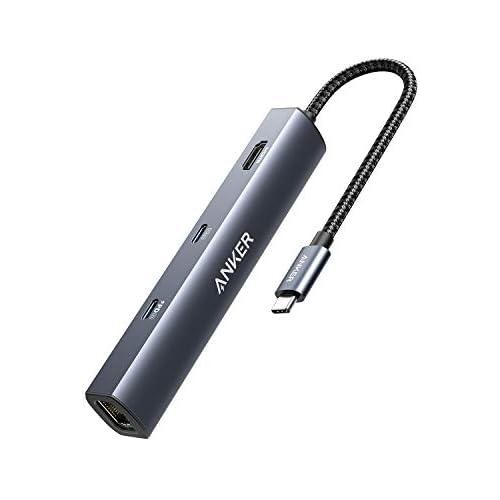
Anker
Anker 543 USB-C Hub (6-in-1, Slim)
Best for Wired InternetA slim hub for students who value Gigabit Ethernet and standard USB expansion.
Wi-Fi is convenient until a crowded dorm, apartment building, library, or shared network becomes unreliable. If your laptop supports the Anker 543, its Gigabit Ethernet port gives it a clear role in a student desk setup.
The 543 combines Gigabit Ethernet with two 5Gbps USB-A ports, one 5Gbps USB-C data port, HDMI, and USB-C Power Delivery input. HDMI supports up to 4K at 30Hz, and a suitable 65W charger can provide up to 53W of pass-through charging to the laptop.
Why it works well for students
Ethernet can be useful for video calls, online classes, large downloads, cloud backups, research files, and rooms where Wi-Fi quality is inconsistent. The mix of USB-A and USB-C data ports is more flexible than a basic HDMI adapter.
What to keep in mind
Anker currently states that this model is not compatible with MacBooks powered by the M2 chip. Keep that warning visible and confirm compatibility before purchase. Its display output is limited to 4K at 30Hz, and there are no SD or microSD card readers.
Best fit
Choose the Anker 543 when Gigabit Ethernet is a main requirement and you have confirmed that your laptop is compatible with the hub.
Pros
- Gigabit Ethernet
- 5Gbps USB-A and USB-C data
- Compact design
Cons
- Not compatible with M2 MacBooks per Anker
- 4K30 and up to 53W pass-through
Key specs from the research
Manufacturer / retailer specifications; not personally tested. Unavailable fields are omitted.
- Compatibility
- Anker states this model is not compatible with MacBooks powered by the M2 chip.
- 6 ports
- HDMI up to 4K at 30Hz
- USB-A and USB-C data up to 5Gbps
- Gigabit Ethernet
- USB-C PD input up to 65W
- Up to 53W pass-through charging
- No SD card reader
- Charger not included
Best fit: Students with a confirmed compatible laptop and a wired network connection.
Best for SD Cards & Portability: Anker USB-C Hub 7-in-1

Anker
Anker USB-C Hub 7-in-1
Best for SD Cards & PortabilityA portable option with 4K60 HDMI and SD/microSD readers, without Ethernet.
Students who need memory-card access without carrying a larger Ethernet-equipped hub may find the Anker A83D2 a useful middle ground.
It combines a 4K at 60Hz HDMI output with two 5Gbps USB-A ports, one 5Gbps USB-C data port, SD and TF/microSD card readers, and USB-C Power Delivery in a compact design.
That makes it particularly useful for students who work with cameras, removable storage, presentations, or media files but do not need wired Ethernet.
Compared with the Anker 555, the A83D2 gives up 10Gbps data speeds and Gigabit Ethernet, but it remains a lighter and simpler option while retaining 4K60 display output and card readers.
With a suitable USB-C charger, it supports up to 85W pass-through charging to the laptop.
Why it works well for students
The A83D2 is a good fit for students who regularly move between a dorm, classroom, library, or lab and want HDMI, common USB data ports, and card readers in one lightweight adapter.
SD and microSD support can be useful for photography, video coursework, cameras, Raspberry Pi projects, recorders, and other devices that rely on removable storage.
What to keep in mind
Unlike the Anker 555 and Anker 543, this hub does not include Ethernet.
Its USB data ports are limited to 5Gbps rather than the 10Gbps available on the Anker 555, so students who frequently use fast external SSDs may prefer the 555.
The USB-C data port is for data rather than video output. 4K60 HDMI requires a compatible host laptop and display connection.
Best fit
Choose the Anker A83D2 if you want 4K60 HDMI and built-in SD/microSD readers in a compact hub and do not need Ethernet or 10Gbps data.
Pros
- 4K60 HDMI on compatible hosts
- SD and TF/microSD readers
- Approximately 67 g
Cons
- No Ethernet
- 5Gbps data rather than 10Gbps
- Charger not included
Key specs from the research
Manufacturer / retailer specifications; not personally tested. Unavailable fields are omitted.
- Compatibility
- 4K at 60Hz requires a compatible host laptop and display connection; downstream USB-C data port does not provide video output.
- Weight
- Approximately 67 g
- 7 ports
- HDMI up to 4K at 60Hz on compatible hosts
- 2 USB-A data ports up to 5Gbps
- 1 USB-C data port up to 5Gbps; data only, no video output
- SD and TF/microSD readers
- USB-C PD input
- Up to 85W pass-through charging with a suitable charger
- No Ethernet
- Charger not included
- Compact, lightweight design
Best fit: Students who need 4K60 and memory-card access in a compact hub and do not need Ethernet.
What Should Students Look for in a USB-C Hub?
The number of ports in a product title is not enough to tell you whether a hub fits your laptop. A seven-port hub can be worse for your setup than a five-port model if those ports are the wrong type or run at the wrong speed.
1. Start with the devices you actually connect
List what normally sits around your laptop: a monitor, keyboard, mouse or receiver, external SSD, flash drive, Ethernet cable, SD card, and charger. If you never use memory cards, paying extra for readers may make little sense. The best hub replaces the adapters you would otherwise carry.
2. 4K at 30Hz vs 4K at 60Hz
4K at 30Hz can be usable for reading, writing, PDFs, browsing, spreadsheets, and presentations. If a 4K monitor becomes your primary desktop display, 60Hz generally feels smoother when scrolling and moving windows. That gives the Anker 555 an advantage for daily external-monitor use.
3. 5Gbps vs 10Gbps data
For a mouse or keyboard, high transfer speed barely matters. For an external SSD, large photo library, video project, backup drive, or research dataset, it matters much more. Students who regularly move large files should prioritize the 10Gbps ports on the Anker 555; ordinary accessories can work well with a 5Gbps hub.
4. Power Delivery input is not the same as laptop charging output
A hub may advertise a maximum PD input, but the hub itself uses some power. In this guide, the Anker 555 and Anker A83D2 are listed at up to 85W to the laptop, the A8357 at up to 90W, and the Anker 543 at up to 53W. Compare the laptop output with the wattage your computer normally expects, and remember that a wall charger is usually sold separately.
5. Ethernet can still matter in a dorm
Wired Ethernet can provide a more predictable connection when local Wi-Fi is crowded or unstable. Before buying specifically for Ethernet, confirm that your dorm, apartment, or campus location actually provides an accessible wired connection.
6. SD and microSD readers are not only for photographers
Card readers can help with cameras, recorders, drones, scientific equipment, Raspberry Pi projects, and other workflows. If you never touch an SD card, that space may be better spent on another USB data port.
7. USB-C does not guarantee display support
Two USB-C ports can look identical while supporting different capabilities. A laptop may support some combination of basic USB data, Power Delivery, DisplayPort Alt Mode, USB4, or Thunderbolt. Check the laptop manufacturer's specifications before buying if HDMI output matters.
USB-C Hub vs Docking Station: Which Should a Student Buy?
Choose a USB-C hub if you use one external monitor, need a few extra ports, want something easy to carry, work from both a dorm and a library, have limited desk space, or need HDMI, Ethernet, or a card reader without building a permanent workstation.
Choose a docking station if you use multiple external monitors, leave many peripherals permanently connected, want a one-cable desktop setup, need a larger mix of display and data ports, or have a more permanent desk.
If your setup has already outgrown a portable hub, read our Best Laptop Docking Stations for Students in 2026 guide.
Frequently Asked Questions
Do I need a USB-C hub for college?
Not necessarily. A hub becomes useful when a thin laptop lacks HDMI, USB-A, Ethernet, a card reader, or enough ports to connect normal accessories at the same time.
Can a USB-C hub charge my laptop?
Many support Power Delivery pass-through charging. Connect a compatible wall charger to the hub, then compare the maximum power delivered to the laptop rather than only the hub's PD input rating. The charger is often sold separately.
Can I connect a monitor through a USB-C hub?
Yes, if the hub has an appropriate display output and the laptop's USB-C port supports video output. A USB-C connector alone does not guarantee DisplayPort Alt Mode, USB4, or Thunderbolt support.
Is 4K at 30Hz enough for studying?
For writing, reading, browsing, spreadsheets, PDFs, and presentations, 4K at 30Hz can be usable. If you use a 4K monitor as your main screen for hours each day, 60Hz generally provides a smoother desktop experience.
Do I need 10Gbps USB ports?
Probably not for a mouse, keyboard, receiver, printer, or ordinary flash drive. 10Gbps becomes more valuable for fast external SSDs and large video, photography, research, or backup files.
Do I need Ethernet in a dorm?
Only if a wired network connection is available and useful in your room. Ethernet can help when Wi-Fi is congested, but some dorms rely almost entirely on wireless networking.
Can I use these hubs with a MacBook?
Compatibility depends on both the MacBook and the individual hub. Anker currently states that the Anker 543 USB-C Hub is not compatible with M2-powered MacBooks. Check current manufacturer compatibility information before purchase.
Should I buy a USB-C hub or a docking station?
A hub is usually simpler for one monitor and a modest number of accessories, especially when portability matters. A docking station makes more sense for a permanent desk with multiple monitors and many connected devices.
Final Thoughts
For most students, the goal is not to buy the USB-C hub with the most ports. It is to buy the smallest hub that comfortably covers the devices you actually use.
The Anker 555 USB-C Hub is the strongest all-round choice because its combination of 10Gbps data, up to 4K60 HDMI, Gigabit Ethernet, SD and microSD readers, and pass-through charging leaves room for a student setup to grow. The Anker 5-in-1 A8357 makes more sense when you only need the basics, while the Anker 543 earns its place when wired Ethernet is a priority and compatibility is confirmed. The Anker A83D2 is a more portable option for students who want 4K60 and removable-memory card readers without Ethernet.
Before buying any hub, check what ports you use, whether your laptop's USB-C connection supports the required display features, and how much charging power your laptop needs. If your setup has grown beyond what a portable hub can comfortably handle, move up to our docking-station guide instead.
Not sure which direction your workspace should take? Use our Product Finder to get a recommendation based on your setup.